
A cloud based datalogging system allows you to monitor environmental conditions in real time, receive instant alerts when readings go out of range, and access your data from anywhere in the world. You do not have to be physically present at the site. You do not have to wait until the end of a shipment to check if the conditions were safe.
In this blog, we cover everything you need to know about a cloud based data logging system, what it is, how it works, which data loggers support it, its features, benefits, and how it enables real-time monitoring. We also cover what OCEAView is and why it is one of the most trusted cloud based datalogging platforms available today.
What is a Cloud Based Datalogging System?
A cloud based datalogging system is a monitoring system where data loggers continuously record environmental conditions like temperature and humidity and send the readings to a cloud-based platform over a wireless network. The data is stored on the cloud and can be accessed at any time from any device with internet access.
Unlike traditional data loggers that store readings only in internal memory, a cloud based datalogging system gives you live access to your data. You can view readings, check graphs, download reports, and receive alerts, all in real time.
This makes cloud based data logging systems ideal for applications where constant monitoring is critical. These include pharmaceutical cold chain monitoring, vaccine storage, hospital environments, food processing, and warehouse monitoring.
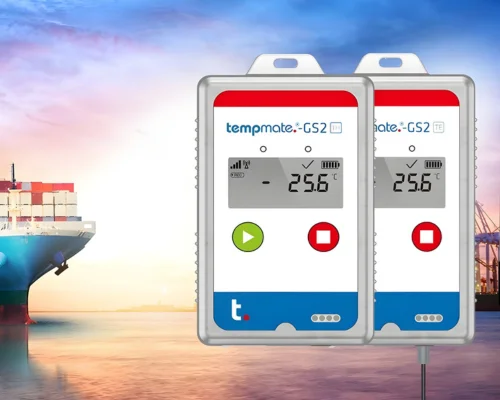
Lisaline Asia supplies cloud based datalogging systems from Dickson and Tempmate. These include the Cobalt X series wireless data loggers paired with the OCEAView cloud platform, and the Tempmate GS2 and Tempmate GM2 GSM data loggers connected to the Tempmate cloud platform.
How Does a Cloud Based Datalogging System Work?
A cloud based datalogging system works in a series of clear steps. Here is how the process works from start to finish:
Data Loggers Monitor Environmental Conditions
Data loggers placed in warehouses, cold rooms, transport vehicles, or cooling boxes for shipping continuously monitor environmental parameters like temperature and humidity. They record these readings at regular set intervals throughout the day and night, without any manual intervention.
Readings are Sent to the Cloud
The data loggers transmit their readings wirelessly to a cloud based platform. Depending on the data logger, the connectivity used may be LoRaWAN, 4G GSM, Wi-Fi, or Bluetooth. For LoRaWAN-enabled loggers like the Cobalt X series, a gateway is placed at the site. The data loggers send readings to this gateway, and the gateway forwards them to the cloud platform OCEAView. For 4G GSM loggers like Tempmate GS2 and GM2, readings are transmitted directly to the Tempmate cloud via cellular network, with no gateway required.
Real-Time Viewing on the Cloud Platform
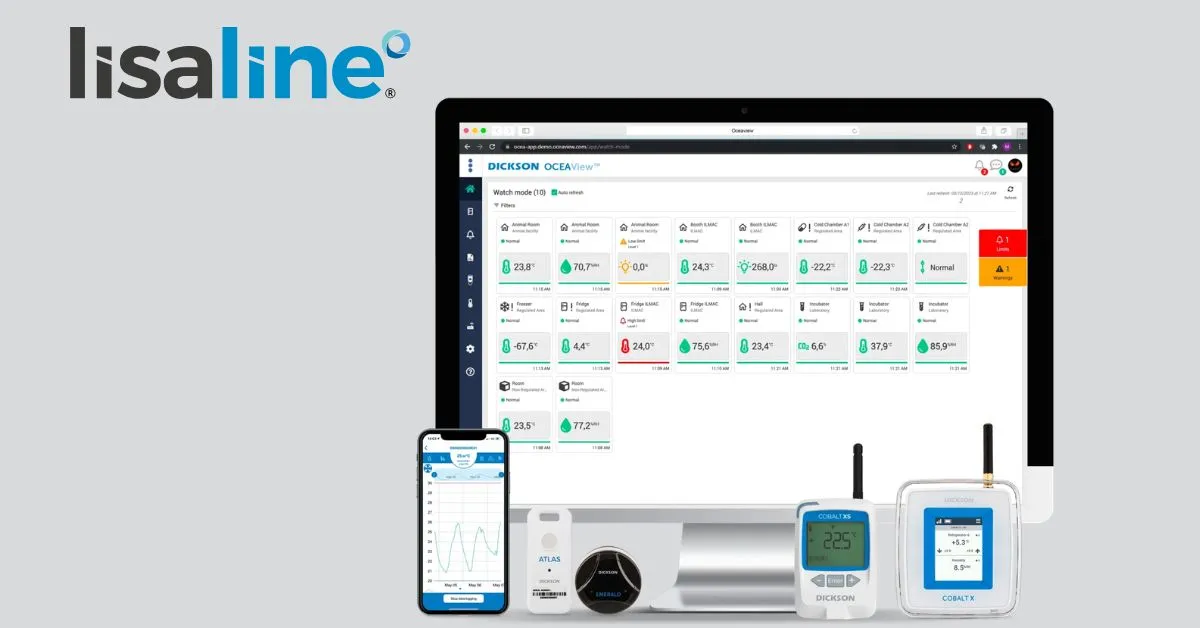
Once the readings reach the cloud platform, they are immediately available for viewing. You can log in to the OCEAView or Tempmate cloud platform from any device — a laptop, tablet, or mobile phone. You can see the live readings, view temperature and humidity graphs over time, and check the current status of all your monitoring points in real time.
PDF and CSV Reports
The cloud platform stores all the recorded data with timestamps. You can download PDF or CSV reports directly from the platform at any time. These reports provide a clear, documented record of all readings, which is essential for compliance, audits, and quality assurance.
Real-Time Alerts
This is one of the most important features of a cloud based datalogging system. When readings go beyond the safe range you have set, the system triggers real-time alerts immediately. These alerts are sent as SMS, email, or voice calls — whichever you configure. Your team gets notified the moment a breach happens, so corrective action can be taken without delay. The alerts are sent in real time, which means there is no waiting and no guessing.
How to Set Up a Cloud Based Datalogging System?
Setting up a cloud based data logging system does not have to be complicated. With the right equipment and a clear process, you can have your system running and monitoring in real time fairly quickly. Here is a step-by-step guide on how to set up a cloud based datalogging system:
Step 1 — Identify Your Monitoring Requirements
Before selecting any equipment, decide what you need to monitor. Ask yourself:
- What parameters do you need to track? Temperature only, or temperature and humidity both?
- How many locations or monitoring points do you have?
- Is the monitoring for a fixed facility like a warehouse or cold room, or for shipments in transit?
- What are the safe ranges for your products?
This will help you choose the right data loggers and the right cloud platform for your needs.
Step 2 — Choose the Right Data Loggers
Once you know your requirements, select the data loggers that best suit your application.
For fixed facility monitoring, Cobalt X series LoRaWAN wireless data loggers from Dickson are a strong choice. They connect to the OCEAView cloud platform and are designed for continuous monitoring in warehouses, cold rooms, and storage facilities.
For shipment or transit monitoring, Tempmate GS2 and Tempmate GM2 4G GSM data loggers are the better option. They use 4G cellular connectivity to send readings to the Tempmate cloud from anywhere in the world, with no gateway needed.
Step 3 — Install the Gateway (for LoRaWAN Systems)
If you are using LoRaWAN-enabled data loggers like the Cobalt X series, you will need to install a gateway at your facility. The gateway receives readings from the data loggers over the LoRaWAN network and forwards them to the OCEAView cloud platform. Place the gateway at a central point within the facility to ensure good signal coverage across all monitoring points.
For Tempmate GSM 4G data loggers, no gateway is needed. The data loggers communicate directly with the Tempmate cloud via the cellular network.
Step 4 — Place the Data Loggers at Monitoring Points
Position your data loggers at the locations you want to monitor. These could be inside cold rooms, inside cooling boxes for shipping, on warehouse shelves, inside transport vehicles, or at any other critical point in your supply chain. Make sure the data loggers are placed where they can accurately capture the environmental conditions of the space.
Step 5 — Create Your Account and Register Your Devices on the Cloud Platform
Set up your account on OCEAView or the Tempmate cloud platform. Register your data loggers to your account. Each data logger has a unique device ID that links it to your account on the platform. Once registered, the data logger will start appearing on your dashboard and transmitting readings to the cloud.
Step 6 — Configure Safe Range Parameters and Alert Settings
This is a critical step. Set the safe temperature and humidity ranges for each monitoring point based on your product requirements. For example, a vaccine cold room may require +2°C to +8°C. Once you set these thresholds, the system will automatically trigger real-time alerts if readings go outside these ranges.
Next, configure who receives the alerts and how. You can set up real-time alerts via SMS, email, or voice calls. You can assign different team members to receive alerts for different monitoring points.
Step 7 — Start Monitoring in Real Time
Once your devices are registered and thresholds are configured, your cloud based datalogging system is live. Log in to OCEAView or the Tempmate cloud platform from your device and you will be able to see live readings from all your data loggers in real time. You can view graphs, track trends, and download PDF or CSV reports whenever needed.
From this point, the system runs automatically. The data loggers record readings, send them to the cloud, and alert your team in real time if anything goes out of range — without any manual intervention.
Which Data Loggers Support a Cloud Based Datalogging System?
Not all data loggers are connected to a cloud platform. Here are the data loggers supplied by Lisaline Asia that support a cloud based datalogging system:
Cobalt X Series- LoRaWAN Wireless Data Loggers (OCEAView Cloud)
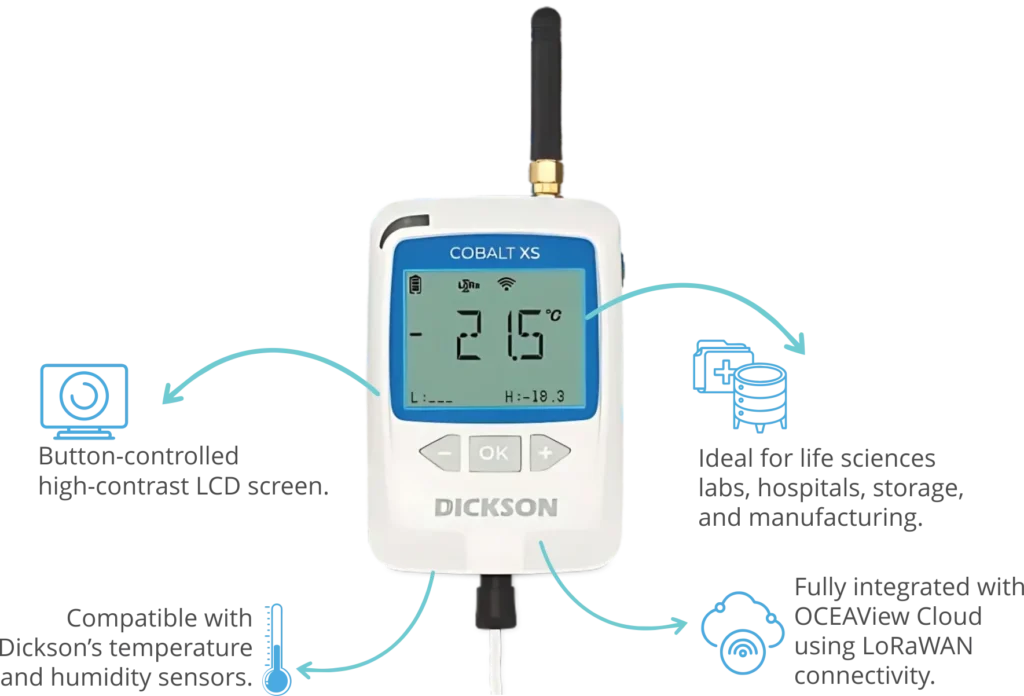
The Cobalt X1 and Cobalt X2 from Dickson are LoRaWAN-enabled wireless data loggers. These data loggers monitor temperature and humidity and send readings via LoRaWAN to a gateway on-site. The gateway then transmits the data to the OCEAView cloud platform. From OCEAView, you can view real-time readings, graphs, download PDF/CSV reports, and receive real-time SMS, email, or app-based alerts when readings go out of range.
Cobalt Xs- Compact LoRaWAN Data Logger (OCEAView Cloud)
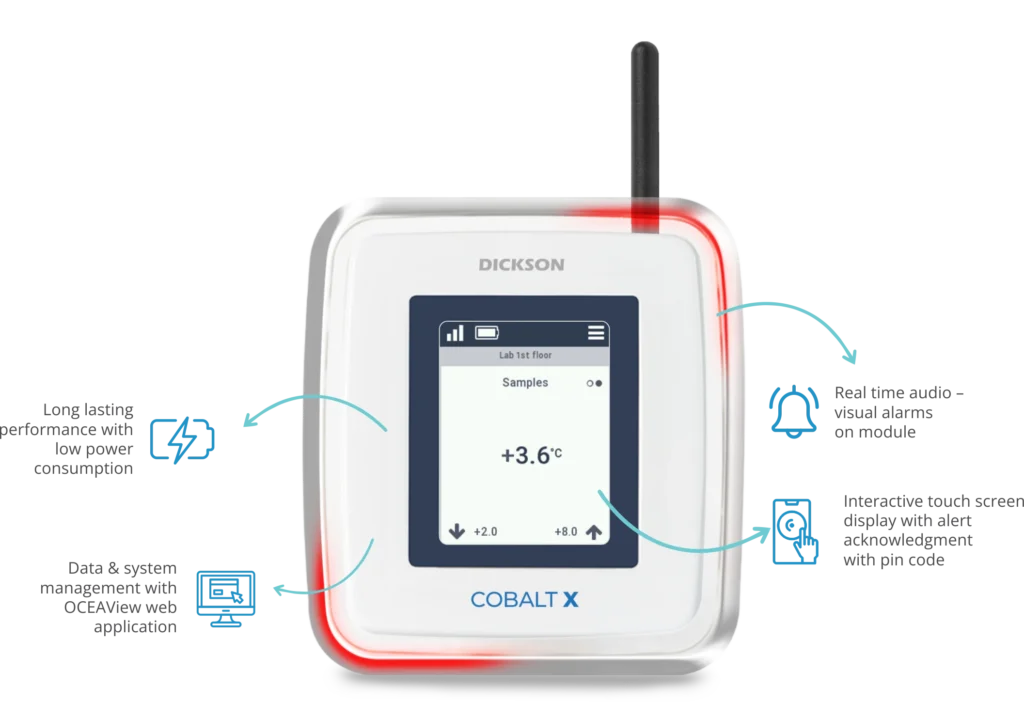
The Cobalt Xs is a compact LoRaWAN data logger from Dickson. It connects to the OCEAView cloud and offers the same real-time monitoring and alert capabilities as the Cobalt X series. It is a space-efficient solution for environments where compact monitoring devices are preferred.
Tempmate GS2 and GM2- 4G GSM Data Loggers (Tempmate Cloud)
The Tempmate GS2 and Tempmate GM2 are 4G data loggers with 2G fallback. These GSM data loggers monitor multiple parameters including temperature, humidity, light, shock, and location. They transmit readings directly to the Tempmate cloud platform via 4G cellular network without needing a gateway. From the Tempmate cloud, you can view live data, graphs, download PDF and CSV reports, and receive real-time alerts via SMS and email from anywhere in the world.
What are the features of a Cloud Based Datalogging System?
A cloud based datalogging system comes with several features that make monitoring more reliable and efficient. Here are the key features:
Real-Time Data Viewing
You can view live temperature and humidity readings from any device at any time. The readings are updated continuously on the cloud platform. This means you always know the current status of your monitoring points, no matter where you are.
Real-Time Alerts
When readings go beyond the set thresholds, the system sends real-time alerts immediately. These alerts can be delivered via SMS, email, or voice calls. This ensures that no breach goes unnoticed and your team can respond as quickly as possible.
Graphical Data Visualisation
The cloud platform displays readings in easy-to-read graphs. These graphs show temperature and humidity trends over time. This helps you quickly identify patterns, spot recurring issues, and make informed decisions.
PDF and CSV Report Downloads
All data is stored on the cloud with timestamps. You can download comprehensive PDF and CSV reports at any time directly from the platform. These reports are audit-ready and support regulatory compliance for industries like pharmaceuticals and healthcare.
Multi-Site and Multi-Device Monitoring
A cloud based data logging system allows you to monitor multiple locations and multiple data loggers from a single platform. You do not need to visit each site separately. All data is visible from one dashboard.
Remote Accessibility
Because the data is on the cloud, you can access it from any device with internet access. This is especially useful for logistics teams monitoring shipments in transit, or facility managers overseeing multiple warehouses.
Customisable Alert Thresholds
You can set specific safe ranges for temperature and humidity based on your application requirements. The cloud based data logging system will only trigger alerts when readings go outside these custom parameters. This reduces unnecessary notifications and ensures alerts are meaningful.
Secure Cloud Storage
All readings are stored securely on the cloud. Data is not lost even if the data logger itself is damaged or misplaced. This ensures a complete and reliable record for compliance documentation.
What are the Benefits of a Cloud Based Datalogging System?
A cloud based datalogging system offers significant advantages over traditional offline data logging. Here are the key benefits:
No Need for Manual Data Retrieval
With traditional data loggers, someone has to physically collect the device and download the data. With a cloud based datalogging system, data is automatically sent to the cloud in real time. There is no manual step required and no risk of data gaps.
Immediate Breach Response
Real-time alerts via SMS, email, or voice calls mean that your team knows about a temperature breach the moment it happens. This allows immediate corrective action. In pharmaceutical cold chain monitoring, this can prevent the loss of an entire batch of medicines or vaccines.
Complete Audit Trails
Every reading is stored on the cloud with a timestamp. This creates a complete, tamper-proof audit trail. This is essential for meeting regulatory requirements from bodies like the WHO, FDA, and EU GDP guidelines.
Reduced Product Loss
By catching breaches early through real-time alerts, a cloud based datalogging system helps reduce product spoilage and loss. Teams can act fast before conditions worsen, especially during shipments or at critical storage facilities.
Better Supply Chain Visibility
With 4G GSM data loggers like Tempmate GS2 and GM2, you can monitor shipments globally. Even if a shipment is in another country, you can see live readings from the Tempmate cloud. This level of visibility helps logistics teams proactively manage cold chain integrity.
Easy Compliance Reporting
Generating compliance reports no longer requires manual data collection or complex calculations. You can download ready-to-use PDF and CSV reports directly from OCEAView or Tempmate cloud at the click of a button.
Scalability
A cloud based data logging system can scale easily. Whether you need to monitor one cold room or fifty warehouses, you can add more data loggers to the system without overhauling the entire setup.
How Does a Cloud Based Datalogging System Allow Real-Time Monitoring?
Real-time monitoring is the defining advantage of a cloud based datalogging system. Here is exactly how it works:
Data loggers continuously measure temperature and humidity at regular intervals. Every reading is transmitted wirelessly to the cloud platform, either through a LoRaWAN gateway for the Cobalt X series, or directly via 4G for Tempmate GSM loggers. The moment a reading is recorded, it appears on the cloud platform.
From OCEAView or the Tempmate cloud, you can open the dashboard and see the current readings live on your screen. You can see exactly what the temperature is at your warehouse right now, even if you are on the other side of the country. You do not have to wait for a report. You do not have to send someone to check. The data is already there, in real time.
The graphs on the cloud platform update continuously. You can see how the temperature has been trending over the last hour, the last day, or the last week. If the temperature has been creeping upward, you can spot the trend before a full breach occurs.
When readings do cross the configured thresholds, the cloud based data logging system does not wait. It sends a real-time alert immediately as an SMS to your phone, an email to your inbox, or a voice call to ensure the message gets through. Multiple team members can be configured to receive these alerts simultaneously. This ensures that someone always acts on the alert, even if one person is unavailable.
This combination of live data viewing and instant real-time alerts means that a cloud based datalogging system gives you complete visibility and zero blind spots.
What is OCEAView Cloud Based Datalogging System?
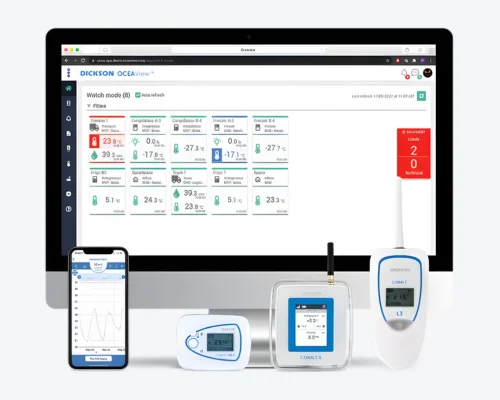
OCEAView is the cloud based datalogging platform from Dickson. It is designed to work seamlessly with the Cobalt X series LoRaWAN wireless data loggers supplied by Lisaline Asia.
OCEAView is a web-based and mobile-accessible cloud platform. This means you can access it from any browser or through the mobile app, from any device, from anywhere. There is no need to install special software.
Here is what OCEAView offers as a cloud based datalogging system:
Real-Time Data Dashboard
OCEAView provides a central dashboard where all your data loggers and their live readings are visible. You can see temperature and humidity readings updating in real time across all your monitoring points at a glance.
Real-Time Alerts
OCEAView sends real-time alerts when readings go outside configured safe ranges. These alerts are delivered via SMS, email, or app-based notifications. You can configure different alert thresholds for different monitoring locations and assign specific team members to receive alerts for specific loggers.
Graphical Trends
OCEAView displays readings as graphs so you can visualise temperature and humidity trends over time. These graphs make it easy to identify patterns and respond to gradual changes before they become critical breaches.
PDF and CSV Report Generation
OCEAView stores all timestamped data and allows you to generate and download PDF and CSV reports directly from the platform. These reports are comprehensive and audit-ready, making compliance documentation simple.
Multi-Location Monitoring
OCEAView supports monitoring across multiple locations from a single account. This is useful for pharmaceutical manufacturers, distributors, hospitals, and any organisation managing cold chain monitoring across several sites.
Secure Cloud Storage
All data recorded by the Cobalt X series data loggers is stored securely on the OCEAView cloud. This ensures that data is never lost and is always available for compliance reviews and audits.
Conclusion
A cloud based datalogging system is no longer a luxury. It is an essential part of modern environmental monitoring for temperature-sensitive products across pharmaceuticals, healthcare, food, and logistics. The ability to view live readings, receive real-time SMS, email, or voice call alerts, access graphs, and download PDF/CSV reports from anywhere in the world gives organisations the confidence that their products are always safe and monitored.
Lisaline Asia supplied data loggers are integrated with cloud based datalogging systems through two trusted platforms- OCEAView for Dickson’s Cobalt X series LoRaWAN wireless data loggers and Tempmate Cloud for Tempmate’s GS2 and GM2 GSM 4G data loggers. Both platforms offer complete real-time monitoring, instant breach alerts, and audit-ready reporting designed to meet the demands of regulated industries.
If you are looking for a reliable cloud based datalogging system for your facility, warehouse, or cold chain shipments, our team at Lisaline Asia is ready to help. Contact us today or visit our website to explore our range of solutions.