
A CO2 incubator looks simple from the outside, but inside it three conditions decide whether your cultures thrive or fail: temperature, humidity and CO2 concentration. Many labs still rely on the incubator’s built-in display or a manual log taken twice a day. That leaves long gaps where an open door, an empty water tray or a failing CO2 supply can go unnoticed. A temperature humidity CO2 data logger closes those gaps by recording all three parameters continuously and alerting your team the moment any of them moves out of range.
In this guide, we explain what a temperature humidity CO2 data logger is, how Dickson’s Triple Smart Sensor measures three parameters through a single probe, and how the Cobalt X1 and Cobalt X2 use it. We also cover where this kind of monitoring is needed, how the three parameters influence one another, and which other Dickson models support the technology.
What is a temperature humidity CO2 data Logger?
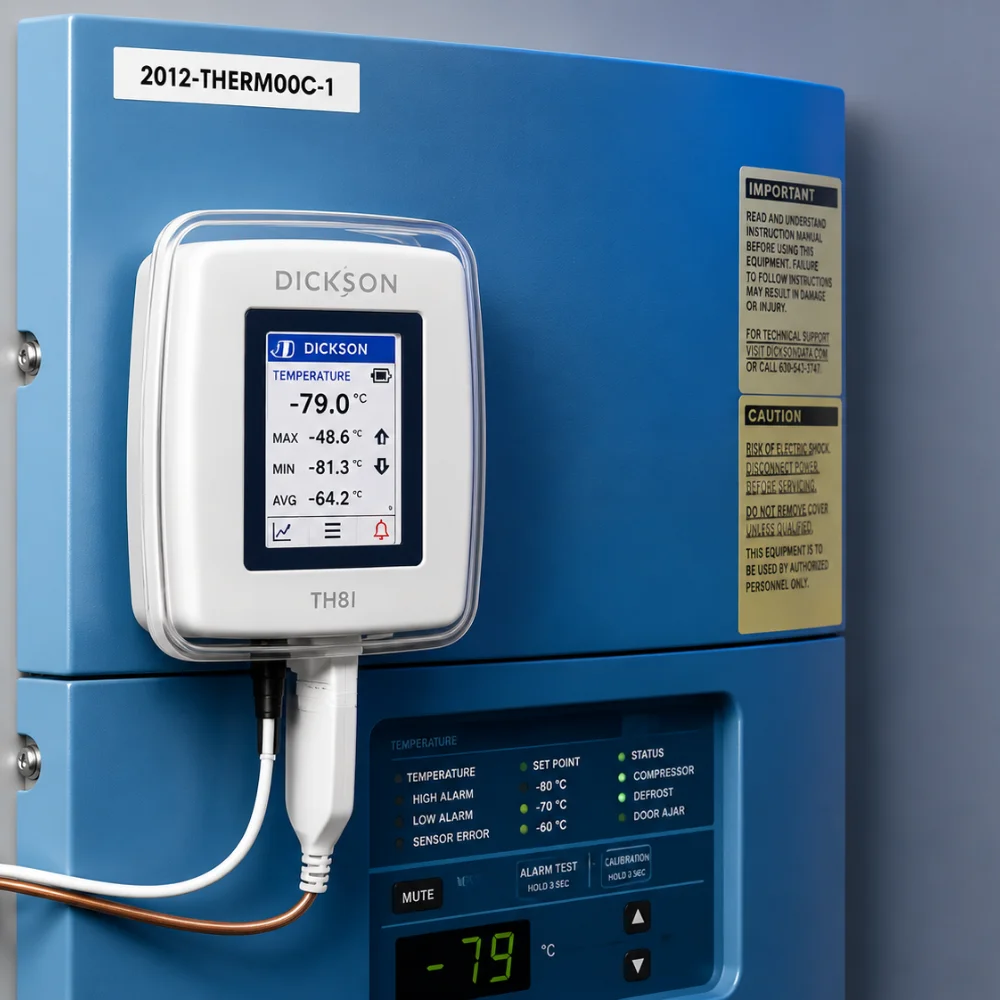
A temperature humidity CO2 data logger is an electronic device that measures temperature, relative humidity and carbon dioxide at set intervals, stores every reading in its memory and sends the data to monitoring software. The software keeps the full history, raises an alarm when a reading crosses a limit and creates reports for audits. You can also think of it as a temperature and humidity data logger with CO2 monitoring system, where the third parameter is part of the same measurement and not an afterthought.
What does a temperature humidity CO2 data logger measure?
- Temperature in °C or °F
- Relative humidity in %RH
- CO2 concentration as a percentage of the air inside the chamber
In short, a temperature and humidity data logger with CO2 monitoring watches the three conditions that matter most in a CO2 incubator.
How is it different from a standard data logger?
A standard logger tracks one parameter, usually temperature. A temperature and humidity data logger with CO2 monitoring also tracks gas concentration, which matters in any chamber where CO2 is injected on purpose to control the environment.
Is it the same as a temperature data logger with multi parameter monitoring?
Not exactly. A temperature data logger with multi parameter monitoring is the broader category. It covers any logger that records temperature along with other parameters such as humidity, CO2, differential pressure or light at the same time. A temperature humidity CO2 data logger is one specific type within that category, built for chambers where all three need to be tracked together.
Why is the incubator’s own display not enough?
- It shows only the current value, not the history
- It cannot alert someone who is away from the lab, at night or on weekends
- It does not create a tamper evident record for audits
- It needs to be checked against an independent reference from time to time
A temperature and humidity data logger with CO2 monitoring fills every one of these gaps.
What Is Dickson’s Triple Smart Sensor Technology?
Dickson’s Triple Smart Sensor is a single, compact probe that measures temperature, relative humidity and CO2 inside a CO2 incubator. Instead of placing three separate sensors in the chamber, you place one, and it connects to the Cobalt X with a single cable. The logger powers the sensor, so no external power supply is needed. This is the sensor that turns Cobalt X into a temperature humidity CO2 data logger.
The name combines two ideas:
- Triple: one sensor unit measures three parameters, which are temperature, humidity and CO2.
- Smart Sensor: the calibration information is stored in the sensor’s own memory and not in the logger.
Why does this matter in daily use?
Because the sensor carries its own calibration data, it works as soon as you plug it in, with no manual setup. When the calibration due date arrives, you replace it with a freshly calibrated sensor and send the old one for recalibration. The swap causes no data gaps and no downtime, so your temperature and humidity data logger with CO2 monitoring never stops recording. Dickson calls this recalibration by sensor exchange.
What are the key specifications of temperature humidity CO2 data logger Cobalt X ?
- Temperature: 0°C to +50°C
- Relative humidity: 0% to 99.9% RH, non condensing, ±4% RH at 90% RH
- CO2: 0 to 20%, ±0.4% at 5% CO2 and 37°C, with 0.1% resolution
- Protection class: IP65 for the sensor unit
- Power: supplied directly by the Cobalt X data logger
- Compatibility: Cobalt X1 and Cobalt X2
Earlier versions of this sensor had a narrower CO2 range, so always confirm the range on the datasheet of the version you are buying.
How is the sensor placed in the incubator?
The sensor sits inside the chamber, and its flat cable passes through the incubator’s access port or behind the door joint, so the door can still close properly.
Can it be used in any incubator?
No. It is designed for incubators that operate with CO2 injection, which is the kind of chamber a temperature humidity CO2 data logger is meant for.
Cobalt X: Temperature Humidity CO2 Data Logger
Cobalt X is Dickson’s flagship touchscreen LCD data logger. Paired with the Triple Smart Sensor, it works as a temperature humidity CO2 data logger for CO2 incubators. It comes in two variants, Cobalt X1 and Cobalt X2, and both send data wirelessly to the OCEAView monitoring solution over LoRaWAN or Bluetooth Low Energy. The table compares both variants as a temperature and humidity data logger with CO2 monitoring.
| Feature | Cobalt X1 | Cobalt X2 |
|---|---|---|
| Measurement points | Up to 2 | Up to 4 |
| Flat cable included | 1 x 1.5 m | 2 x 1.5 m |
| Triple Smart Sensor readings stored | Two of the three | All three |
| Touchscreen | 2.4 inch, colour, glove compatible | Same |
| Connectivity | LoRaWAN and Bluetooth Low Energy | Same |
| Alarm limits | 3 high and 3 low per measurement point | Same |
What is the difference between Cobalt X1 and Cobalt X2 for CO2 monitoring?
When used with the Triple Smart Sensor, Cobalt X1 stores only two of the three readings, while Cobalt X2 stores all three. If you want every incubator to have a complete temperature and humidity data logger with CO2 monitoring setup, Cobalt X2 is the variant to choose.
How does Cobalt X monitor temperature, humidity and CO2?
The Triple Smart Sensor measures the three parameters continuously inside the incubator. Cobalt X reads them at the interval you have set, saves every reading in its on-board memory and transmits the data to OCEAView. OCEAView keeps the history, shows trends and sends alerts to your team. This is how a temperature and humidity data logger with CO2 monitoring turns raw readings into a record you can act on and audit.
Does Cobalt X use separate sensors or a single sensor?
For CO2 incubator monitoring, it uses a single sensor. All three readings come from one integrated Triple Smart Sensor with one cable and one connection point, so there is only one probe to place, one to calibrate and one to swap. A temperature humidity CO2 data logger built with three separate probes would mean three cables, three calibrations and three items to handle at every recalibration.
How many external sensors does Cobalt X support?
- Cobalt X1: up to 2 measurement points
- Cobalt X2: up to 4 measurement points
Both variants accept all Dickson Smart Sensors, digital temperature sensors and third party Pt100 sensors through adapters. They also work with Bluetooth wireless sensors such as Dickson Atlas and Emerald. Cobalt X also supports differential pressure, 4 to 20 mA, 0 to 5 V or 0 to 10 V signals, dry contact and light sensors. That range makes Cobalt X a temperature data logger with multi parameter monitoring that you can use beyond the incubator as well.
How do you set alarm limits for each parameter?
Cobalt X supports 3 high and 3 low programmable alarm or warning limits for each measurement point, with a programmable delay for each limit. When Cobalt X works as a temperature humidity CO2 data logger, each parameter can have its own set of limits, because temperature, humidity and CO2 are separate measurement points.
Setting alarm limits on a temperature and humidity data logger with CO2 monitoring takes only a few steps:
- Fix the acceptable range for each parameter from your SOP and the incubator manufacturer’s guidance.
- Open the data logging configuration in OCEAView and select the measurement point for the parameter.
- Set your high and low warning limits first, then the wider alarm limits.
- Add a delay to each limit.
- Save the configuration and sync it with the logger. Alarm management then runs on board, so the logger itself generates the alarm and transmits it to OCEAView.
Why do alarm limits differ between temperature, humidity and CO2?
Each parameter has a different tolerance. Cultures react to very small temperature changes, CO2 shifts alter the pH of the medium, and humidity drifts more slowly. The table shows example limits for an incubator running at 37°C, 5% CO2 and around 95% humidity. These are illustrations only, so set your own limits as per your protocol.
| Parameter | Example setpoint | Example low limit | Example high limit |
|---|---|---|---|
| Temperature | 37.0°C | 36.5°C | 37.5°C |
| CO2 | 5.0% | 4.5% | 5.5% |
| Relative humidity | 95% | 85% | 99% |
A delay of a few minutes lets normal door openings pass without nuisance alarms while still catching a real fault early. Most labs fine tune these delays after observing a few weeks of data.
How do you set monitoring intervals for each parameter?
In a temperature and humidity data logger with CO2 monitoring setup, the sensor reading interval is adjustable for each measurement point, so temperature, humidity and CO2 can each be read at a different interval. Choose an interval short enough for a door opening or a gas supply fault to show clearly in the trend. A few minutes is a common starting point for incubators.
What happens when a limit is crossed?
When a parameter crosses a limit, the temperature humidity CO2 data logger responds in several ways:
- Flashing lights on the logger signal the alarm
- A buzzer sounds when the logger is on AC power
- The touchscreen shows the alarm status
- The alarm is acknowledged on screen with a PIN code
- The alert is transmitted to OCEAView so your team is notified
Which Products and Environments Require a Temperature Humidity CO2 Data Logger?
CO2 incubators are the main reason labs install a temperature humidity CO2 data logger. Any lab that depends on a stable CO2 environment benefits from continuous monitoring.
Which products and processes need a temperature humidity CO2 data logger?
- Cell cultures, including stem cell cultures
- Tissue and primary cell cultures
- Embryo culture in fertility clinics
- Microbial cultures in microbiology laboratories
- Cell based tests in diagnostic and pharmaceutical quality control labs
Which environments use a temperature and humidity data logger with CO2 monitoring?
- Hospital and pathology laboratories
- Fertility and IVF clinics
- Pharmaceutical research and quality control laboratories
- University and research institute laboratories
- Microbiology and diagnostic laboratories
Why do these environments need a temperature humidity CO2 data logger?
A temperature and humidity data logger with CO2 monitoring gives these labs four clear benefits:
- Cultures are protected from small deviations that manual checks miss
- Documented records support audits and internal quality checks
- Alarms reach the team even when nobody is in the lab
- Trend data helps you spot a failing incubator before it damages your cultures
Can Cobalt X monitor other equipment?
Yes. Dickson lists refrigerators, freezers, ultra low temperature freezers, nitrogen tanks, water baths, ovens, autoclaves, cold rooms, cleanrooms and warehouses along with CO2 incubators. A lab can therefore use Cobalt X as a temperature data logger with multi parameter monitoring across its equipment, using the Triple Smart Sensor only where CO2 needs to be tracked.
How Do Changes in One Parameter Affect Others in Temperature, Humidity and CO2 Monitoring?
The three parameters inside a CO2 incubator are linked, which is why a temperature and humidity data logger with CO2 monitoring is more useful than three single parameter loggers. A change in one parameter often shows up in the other two.
What happens when the incubator door is opened?
Temperature drops as warm air escapes, CO2 falls quickly because the gas leaves with it, and drier room air enters, so humidity changes too. A temperature humidity CO2 data logger records all three events on the same timeline, so you can see how long each parameter takes to recover.
How does temperature affect humidity?
Relative humidity depends on temperature because warm air holds more moisture than cool air. If temperature falls, relative humidity rises and condensation can form on surfaces. If temperature rises, water evaporates faster from the humidity tray and the medium, and relative humidity can drop.
How does humidity affect cultures?
When humidity is low, the culture medium loses water through evaporation. Salts and nutrients become more concentrated, which stresses the cells. A slow, steady fall in humidity often points to an empty water tray, and a temperature data logger with multi parameter monitoring makes this visible long before the cultures show any damage.
How does CO2 affect the culture medium?
Most culture media rely on a bicarbonate buffer, so the CO2 level in the chamber helps decide the pH of the medium. If CO2 falls, the medium turns more alkaline, and if it rises, the medium turns more acidic. A perfect temperature cannot make up for a CO2 shift, which is why a temperature and humidity data logger with CO2 monitoring must track CO2 and not only temperature.
Does temperature influence CO2 readings?
Yes, indirectly. Gas dissolves differently in the medium at different temperatures, and Dickson specifies the CO2 accuracy of the Triple Smart Sensor at 37°C. A stable temperature therefore supports dependable CO2 readings, which is another reason to track both on one temperature humidity CO2 data logger.
Which patterns help you find the cause of a problem?
- CO2 falling while temperature and humidity stay stable often points to the gas supply
- Temperature and CO2 both dipping at regular times usually suggests frequent door openings
- Temperature dropping while humidity rises points to a heating problem
- Humidity falling gradually points to a low water level
Reading the three trends together on a temperature humidity CO2 data logger helps your team find the cause much faster than checking each parameter on its own.
Do Other Dickson Data Logger Models Like Cobalt XS, Emerald and Atlas Support the Triple Smart Sensor Technology?
No. The Triple Smart Sensor is built for the Cobalt X family. If you want a temperature humidity CO2 data logger from Dickson’s range, Cobalt X1 or Cobalt X2 are the models to choose.
Why does Cobalt XS not support it?
Cobalt XS uses Dickson’s Smart Sensor technology for its temperature and humidity probes, but according to Dickson’s datasheet, it supports only temperature and temperature with humidity sensors on a single Binder connector. With no CO2 sensing, it cannot work as a temperature humidity CO2 data logger.
Can Emerald and Atlas still be used with Cobalt X?
Yes. Emerald and Atlas can work as Bluetooth wireless sensors paired with a Cobalt X data logger. Emerald adds a temperature reading and Atlas adds temperature, humidity and light readings from hard to reach places. Cobalt X can then act as a temperature data logger with multi parameter monitoring, with the Triple Smart Sensor inside the incubator and an Emerald or Atlas elsewhere. This combination gives you a temperature and humidity data logger with CO2 monitoring in the incubator and temperature or light data from the rest of your lab.
Why Choose Lisaline Asia for a Temperature Humidity CO2 Data Logger?
Lisaline Asia has operated since 1998 and introduced the world’s first miniaturised Vaccine Vial Monitor in India. When you choose a temperature humidity CO2 data logger from us, you get more than a device:
- Right variant, right advice: we help you choose between Cobalt X1 and Cobalt X2, so your temperature and humidity data logger with CO2 monitoring stores every reading you need
- Complete setup: Cobalt X, the Triple Smart Sensor and the monitoring software supplied together
- Calibration support: ISO 17025 calibration through a NABL accredited facility, available on site or in the lab
- Validation services: IQ/OQ validation and thermal mapping for your equipment
- Wide connectivity options: LoRaWAN, Wi-Fi, GSM and Bluetooth loggers across our range, so Cobalt X fits alongside the other loggers in your facility
- One supplier for all monitoring needs: a temperature data logger with multi parameter monitoring for your incubators and the other equipment in your lab.
Conclusion- Temperature Humidity CO2 Data Logger
A temperature humidity CO2 data logger protects your cultures by recording the three conditions that matter most and alerting your team the moment one of them drifts. Dickson’s Triple Smart Sensor does this through a single probe, with calibration data stored inside the sensor and recalibration by simple sensor exchange. Cobalt X2 stores all three readings and gives you a complete temperature and humidity data logger with CO2 monitoring. And because Cobalt X also supports other sensors, it works as a temperature data logger with multi parameter monitoring for the rest of your equipment.
If you have any queries or want to order a temperature, humidity and CO2 monitoring data logger system for your cold storage facility or incubators, visit our website today.